Core System Functions
Mobile Warehouse Execution Built for Epicor ERP
ACC Mobile WMS delivers core warehouse functions through a single mobile-first interface. Each function connects directly to Epicor ERP for real-time inventory updates, barcode-driven execution, and full traceability.
Purchase Receipt
Fast and Accurate Goods Receiving
The Purchase Receipt function enables warehouse staff to receive incoming goods against purchase orders using mobile barcode scanning. Items, quantities, and storage locations can be confirmed instantly, ensuring accurate inventory records and faster receiving operations.
Key Highlights
- Purchase order retrieval via barcode or manual entry
- Item barcode scanning for fast receiving
- Quantity verification against purchase order lines
- Real-time inventory updates upon confirmation
- Optional label printing for received goods
Mobile receiving interface for purchase orders with barcode scanning and quantity confirmation.
Receiving is faster and more accurate with barcode scanning and instant ERP updates.
Production Receipt
Receive Finished and Semi-Finished Goods into Inventory
The Production Receipt function allows warehouse or production staff to receive completed or semi-finished items from manufacturing into inventory. Quantities are recorded against job or production orders, with lot and serial support where required, and inventory is updated in Epicor ERP in real time.
Key Highlights
- Job or production order selection via barcode or search
- Quantity entry with optional lot and serial capture
- Real-time inventory and WIP updates in Epicor ERP
- Support for partial receipts and multi-line jobs
- Audit trail for production-to-warehouse movement
Production receipt entry with job reference and quantity confirmation.
Production receipts flow straight into ERP — no re-keying, full traceability.
Job Issue
Issue Materials to Production Jobs with Full Traceability
The Job Issue function supports issuing raw materials and components from inventory to manufacturing jobs. Warehouse or production staff can scan job and material barcodes to record issues against the correct job and operation, with quantities and lot/serial captured and synced to Epicor ERP.
Key Highlights
- Job and operation selection via barcode or search
- Material barcode scanning for fast, accurate issue
- Quantity and optional lot/serial capture
- Real-time inventory deduction and job material consumption in ERP
- Support for partial issues and multi-line jobs
Job issue entry with material scan and quantity confirmation.
Job issues are recorded at the point of use with full traceability back to the job.
Job Return
Return Unused Materials from Jobs to Inventory
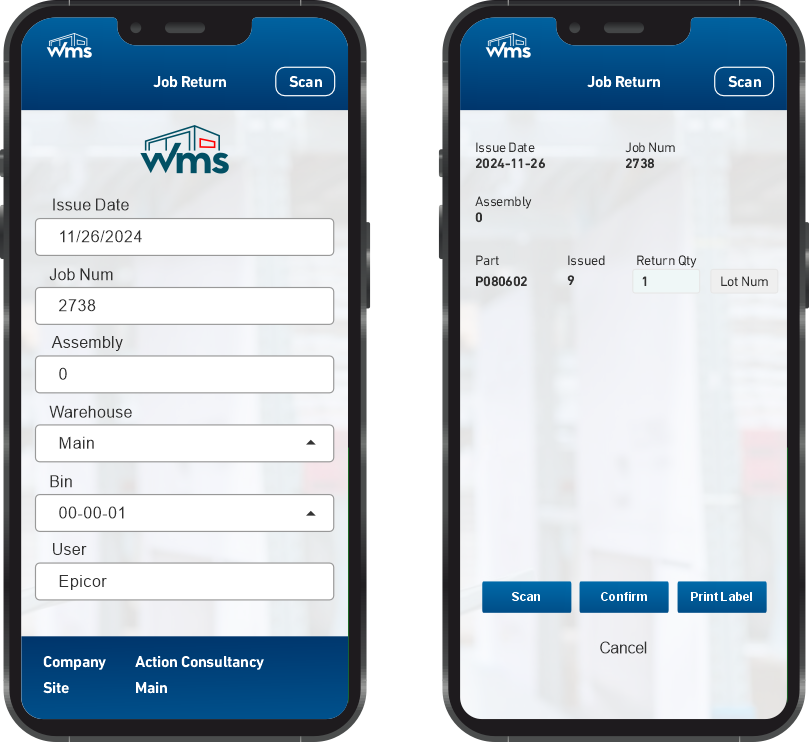
The Job Return function allows returning unused or excess materials from manufacturing jobs back to inventory. Staff scan the job and material to record the return quantity; inventory is updated in Epicor ERP and job material consumption is adjusted accordingly, maintaining accurate stock and job costing.
Key Highlights
- Job and material selection via barcode or search
- Return quantity entry with optional lot/serial
- Real-time inventory increase and job consumption adjustment in ERP
- Support for partial returns and reason codes
- Full audit trail for returns to stock
Job return entry with quantity and optional reason code.
Returns are quick to process and inventory stays in sync with the job.
Miscellaneous Issue
Flexible Issue for Non-Production Movements
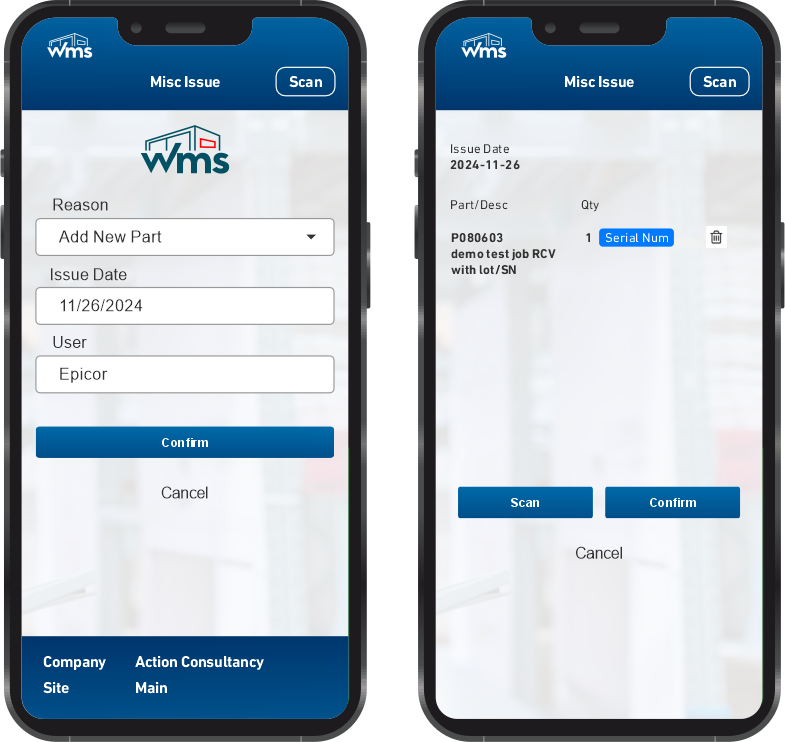
The Miscellaneous Issue function supports issuing inventory for purposes not tied to a purchase order or job — such as scrap, samples, repairs, or internal transfers. Users select item, quantity, and optionally lot/serial and reason code; inventory is deducted in Epicor ERP with full auditability.
Key Highlights
- Item and quantity entry via barcode or search
- Optional lot/serial and reason code for compliance
- Real-time inventory deduction in Epicor ERP
- Support for multiple issue types (scrap, sample, etc.)
- Audit trail for all miscellaneous issues
Miscellaneous issue entry with item, quantity, and reason.
We use misc issue for samples and scrap — simple, fast, and fully tracked.
Shipment
Pick, Pack, and Ship with Barcode Verification
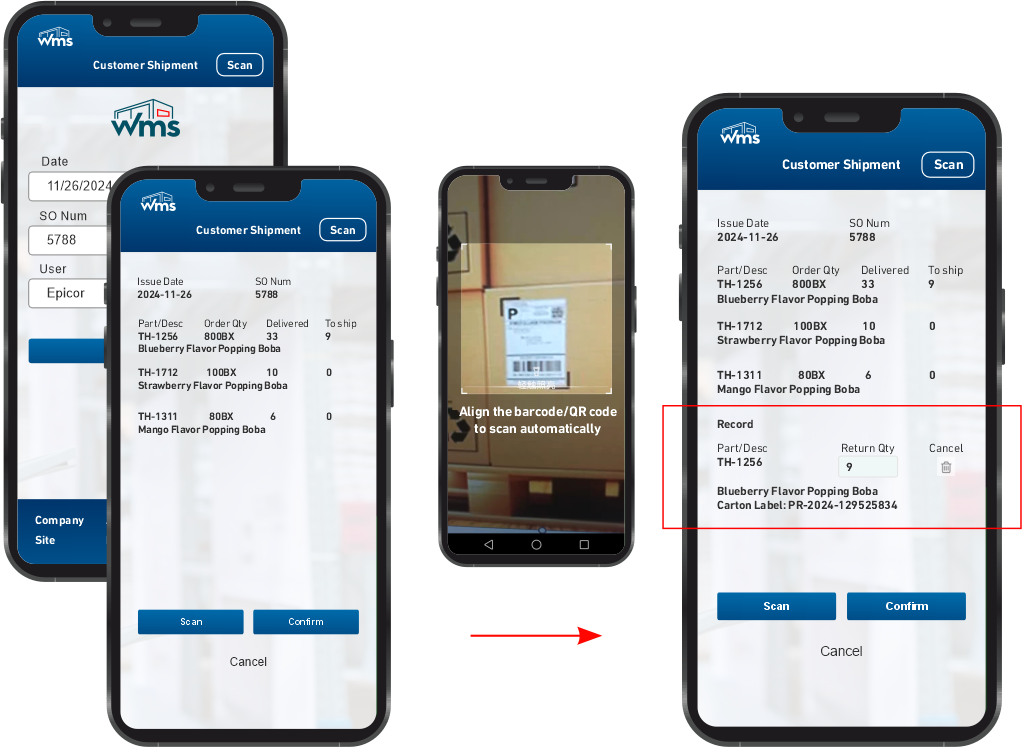
The Shipment function supports outbound order fulfillment with mobile-driven pick, pack, and ship. Warehouse staff can select sales orders or transfer orders, scan items and quantities for picking, confirm shipment, and post inventory deductions in Epicor ERP — with optional packing list and label printing.
Key Highlights
- Order selection via barcode or search (sales order, transfer order)
- Pick confirmation with item and quantity scanning
- Shipment posting with real-time inventory update in ERP
- Optional lot/serial capture for traceability
- Support for partial shipments and packing documentation
Shipment confirmation with order and line-level scanning.
Shipping is faster and errors drop when every line is scanned and confirmed.
Putaway
Direct Inventory to the Right Location
The Putaway function guides warehouse staff to place received or moved inventory into the correct bin or location. Users can scan the item (and optionally lot/serial) and the target location; the system validates the putaway and updates bin quantity in Epicor ERP, supporting directed putaway rules and location capacity.
Key Highlights
- Item and optional lot/serial scanning for putaway
- Target bin or location selection via barcode or search
- Quantity confirmation and real-time bin update in ERP
- Support for directed putaway and location validation
- Audit trail for putaway transactions
Putaway entry with item and bin selection.
Putaway is straightforward — scan item, scan bin, confirm. Inventory is always in the right place.
Inspection
Record Quality Inspection Results at Receipt or In-Process
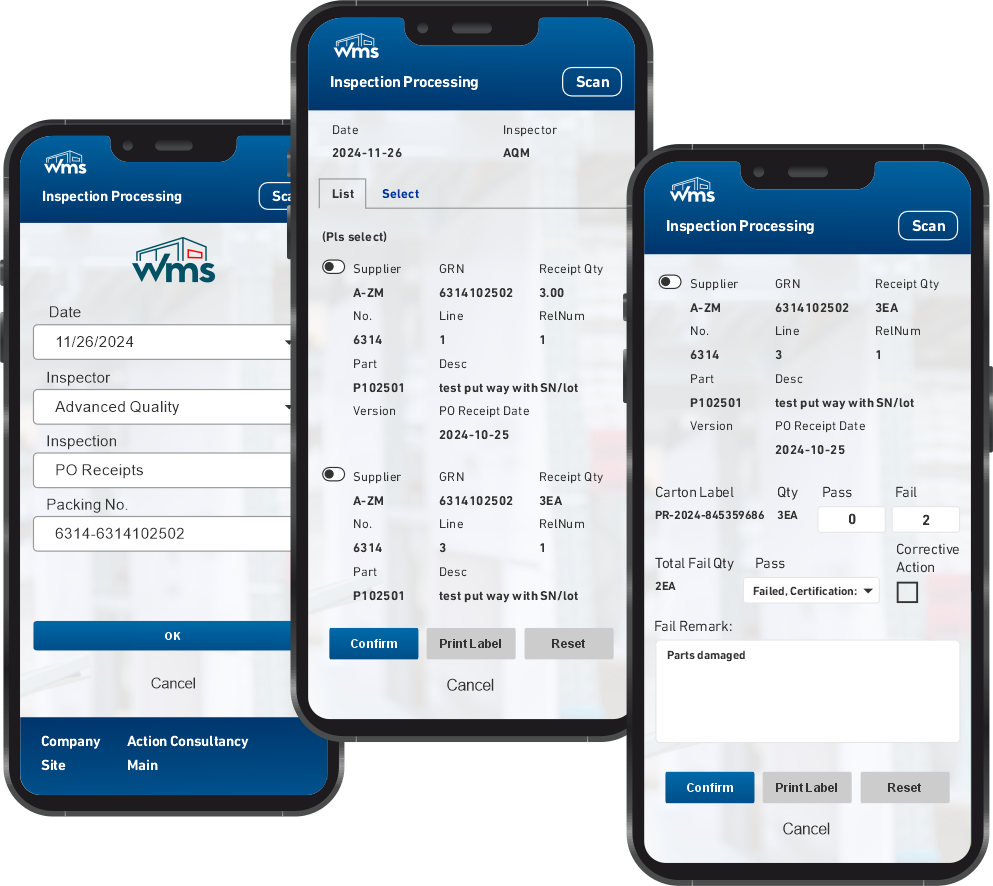
The Inspection function allows quality or warehouse staff to record inspection results for received or in-process inventory. Inspected quantities can be accepted, rejected, or held; results and optional defect codes sync to Epicor ERP to support quality hold and non-conformance workflows.
Key Highlights
- Link inspection to receipt or job (PO, job, lot/serial)
- Accept / reject / hold with quantity and optional defect codes
- Real-time quality status and hold updates in Epicor ERP
- Support for multiple inspection stages and criteria
- Audit trail for inspection decisions
Inspection entry with accept/reject/hold and optional defect codes.
Inspection results are captured at the point of check and flow straight into ERP.
DMR
Discrepancy Material Report for Receiving and Quality
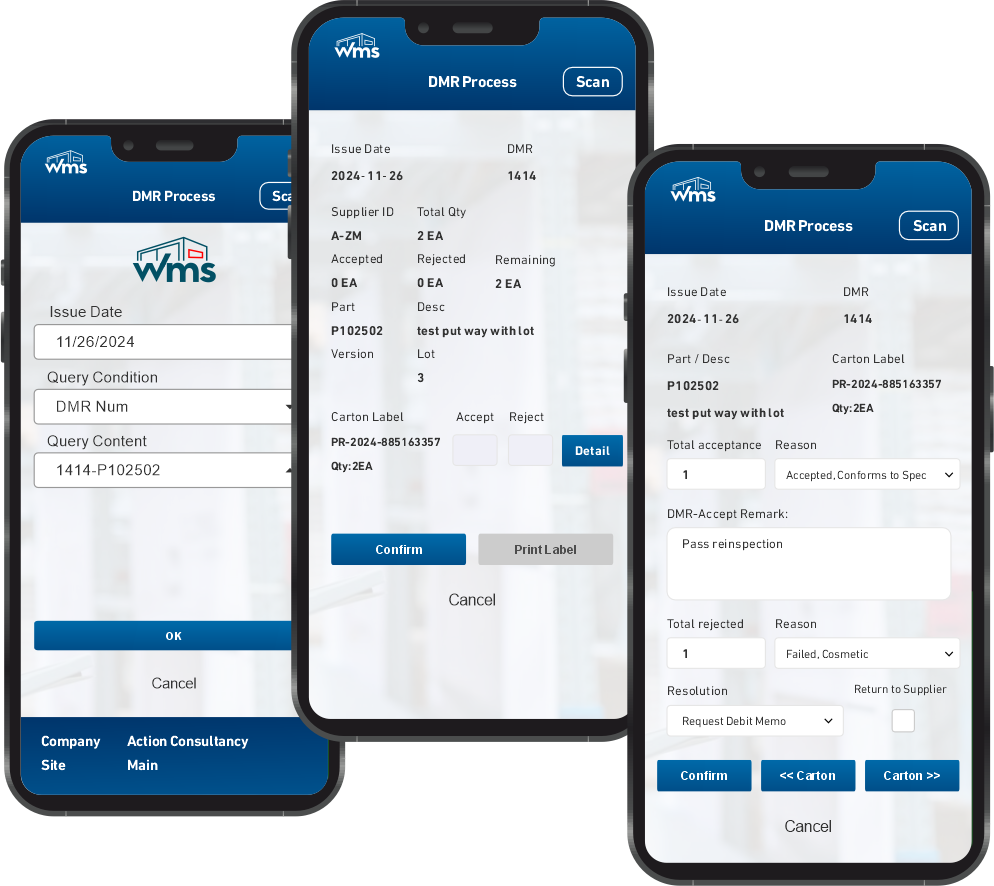
The DMR (Discrepancy Material Report) function supports recording and resolving quantity or quality discrepancies at receipt or inspection. Users can create and submit DMR records from the mobile device with reference to PO, lot, or serial; the system supports follow-up actions and integration with Epicor ERP discrepancy and quality modules.
Key Highlights
- Create DMR linked to receipt or inspection
- Record discrepancy type, quantity, and description
- Optional photo or comment attachment
- Status tracking and resolution workflow
- Integration with ERP discrepancy and quality processes
DMR creation with discrepancy details and reference to receipt.
Discrepancies are logged on the spot so we can resolve them quickly.
Non-Conformance
Capture and Track Non-Conforming Material or Product
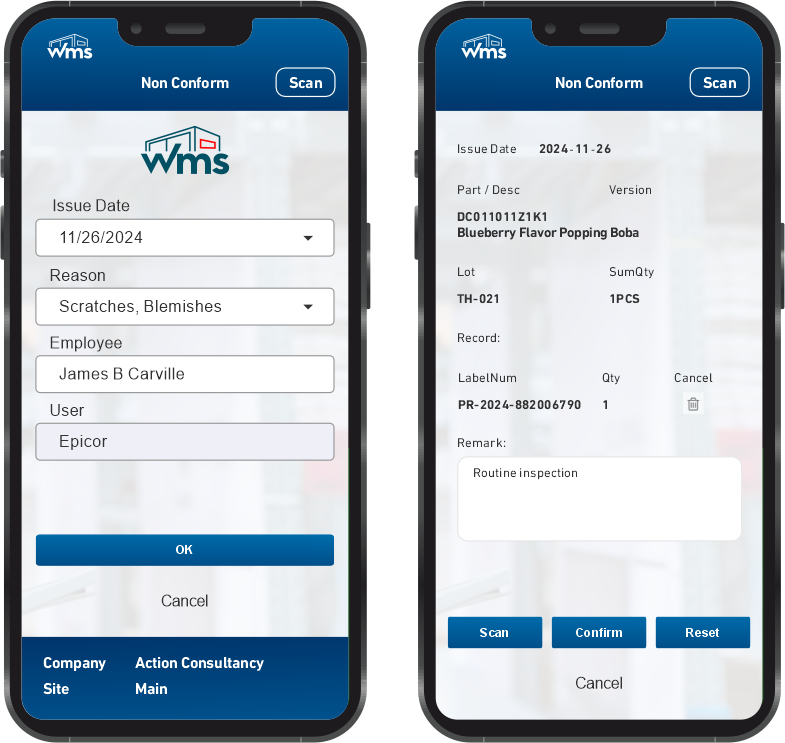
The Non-Conformance function allows warehouse or quality staff to record non-conforming inventory — by item, lot, serial, or location — and link it to root cause and disposition. Records sync to Epicor ERP to support quarantine, rework, scrap, or return workflows and maintain compliance and traceability.
Key Highlights
- Record non-conformance for item, lot, serial, or location
- Root cause and disposition (quarantine, rework, scrap, return)
- Real-time sync to ERP non-conformance and quality modules
- Support for corrective action and follow-up
- Full audit trail for compliance
Non-conformance entry with disposition and root cause.
Non-conformance is captured where it happens and tied to the right inventory.
Transfer Order Shipment/Receipt
Complete Inter-Site and Inter-Warehouse Transfers on Mobile
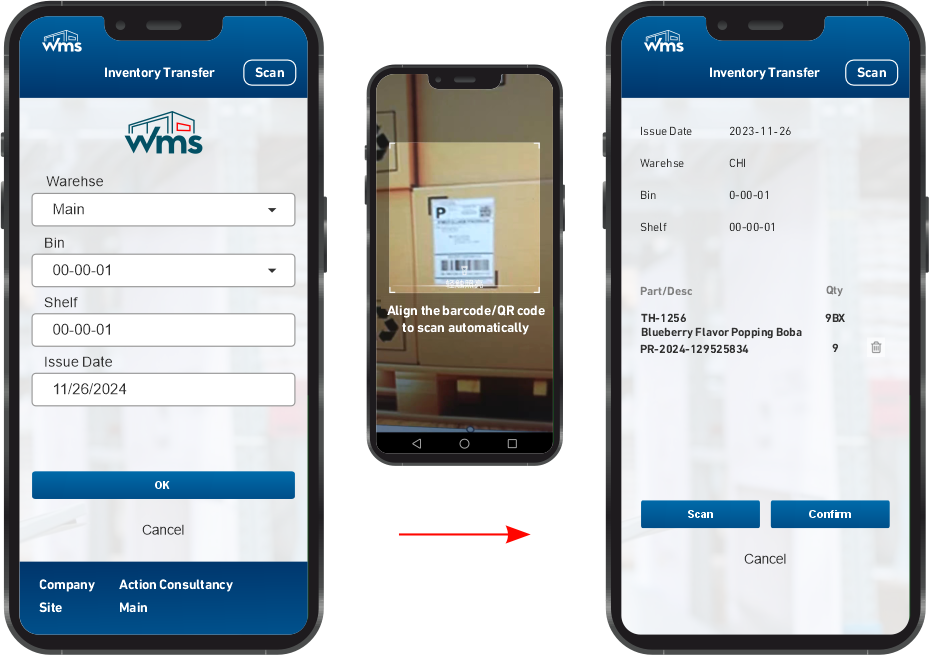
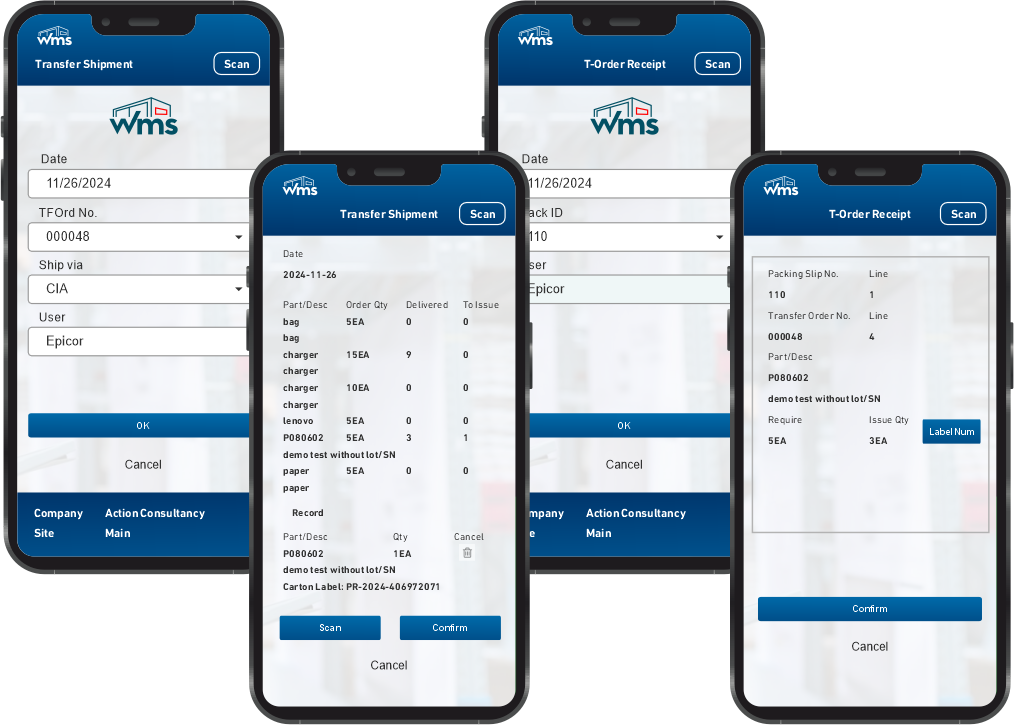
The Transfer Order Shipment/Receipt function supports shipping and receiving sides of inventory transfers between sites or warehouses. Staff can pick and ship from the source location and receive at the destination using barcode scanning; quantities and locations update in Epicor ERP so inter-location inventory is always accurate.
Key Highlights
- Transfer order selection via barcode or search
- Ship: pick and confirm shipment from source warehouse
- Receive: confirm receipt at destination with optional putaway
- Real-time inventory update at both locations in ERP
- Support for partial transfers and lot/serial traceability
Transfer order shipment or receipt with line-level confirmation.
Transfers between warehouses are simple: ship at source, receive at destination, all on the device.
Combine / Split Carton
Reconfigure Carton Contents for Flexible Handling
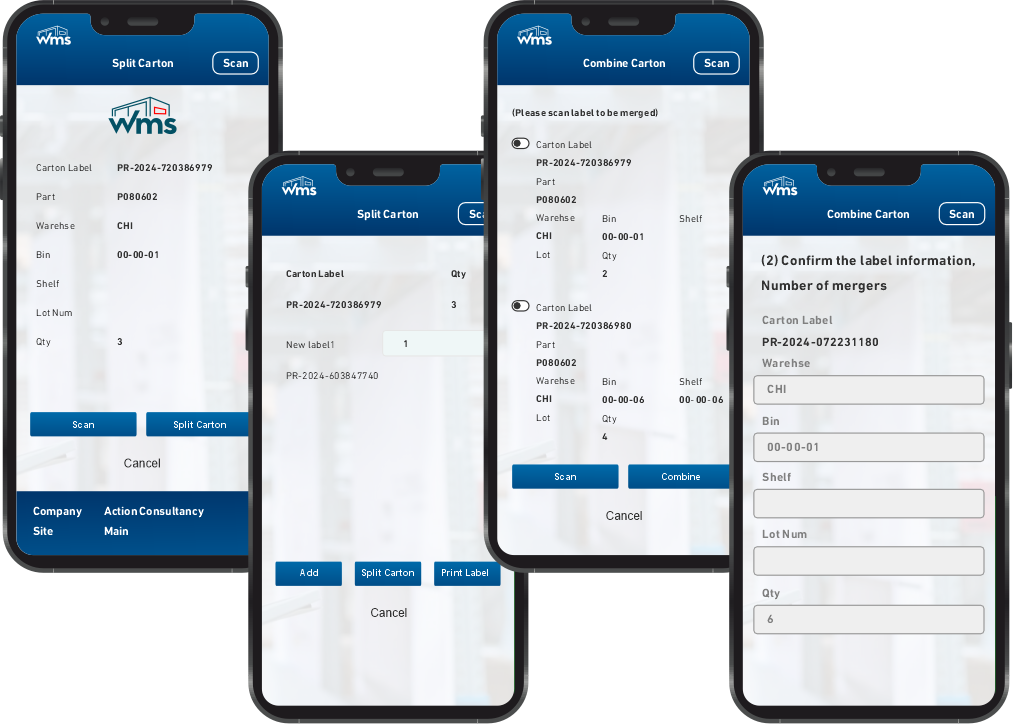
The Combine / Split Carton function allows warehouse staff to merge multiple cartons into one or split one carton into several, with quantity and optional lot/serial preserved. The system updates carton-level and inventory records in Epicor ERP so physical and system quantities stay aligned for picking and shipment.
Key Highlights
- Combine: select source cartons and create a single new carton
- Split: select source carton and create multiple new cartons with quantities
- Lot/serial reassignment where applicable
- Real-time carton and inventory update in ERP
- Audit trail for combine/split transactions
Combine or split carton with quantity and carton ID management.
When we need to rebalance cartons, combine/split keeps the system in sync with the floor.
Inventory Label
Print Barcode Labels for Items, Lots, and Locations
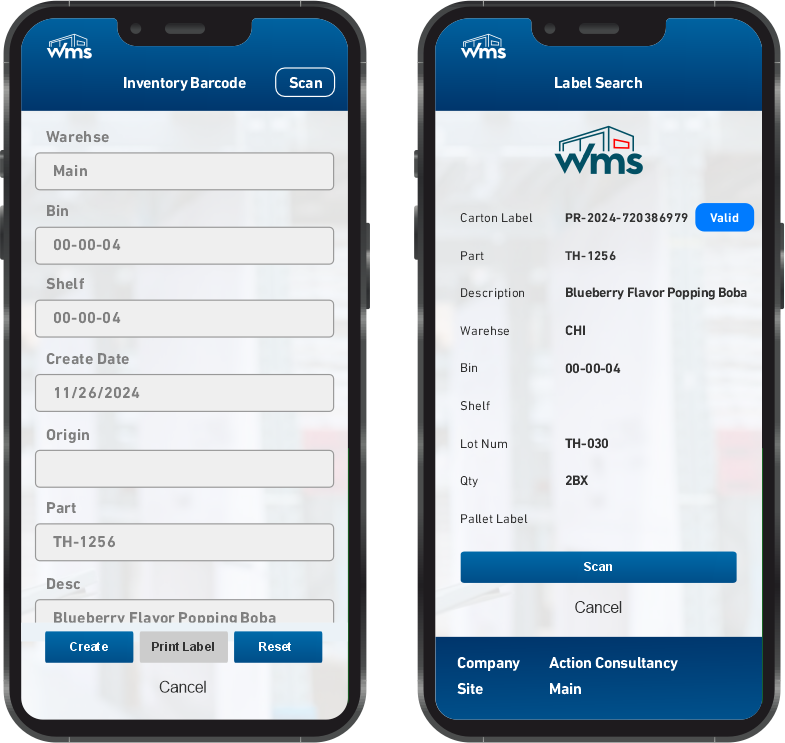
The Inventory Label function supports printing barcode labels for items, lots, serials, bins, and cartons. Labels can be generated on demand from the mobile device or from receipt, putaway, and other transactions, using templates defined in Epicor ERP so warehouse identification and scanning remain consistent.
Key Highlights
- Print labels for item, lot, serial, bin, or carton
- Label content driven by ERP label templates
- On-demand print from transaction screens (e.g. receipt, putaway)
- Support for standard barcode formats (Code 128, QR, etc.)
- Consistent labeling across receiving, storage, and shipment
Label print selection by type (item, lot, bin, carton) and template.
We print labels right from the device — no need to go back to the desk.
Enquiry
Look Up Inventory, Orders, and Transactions on the Go
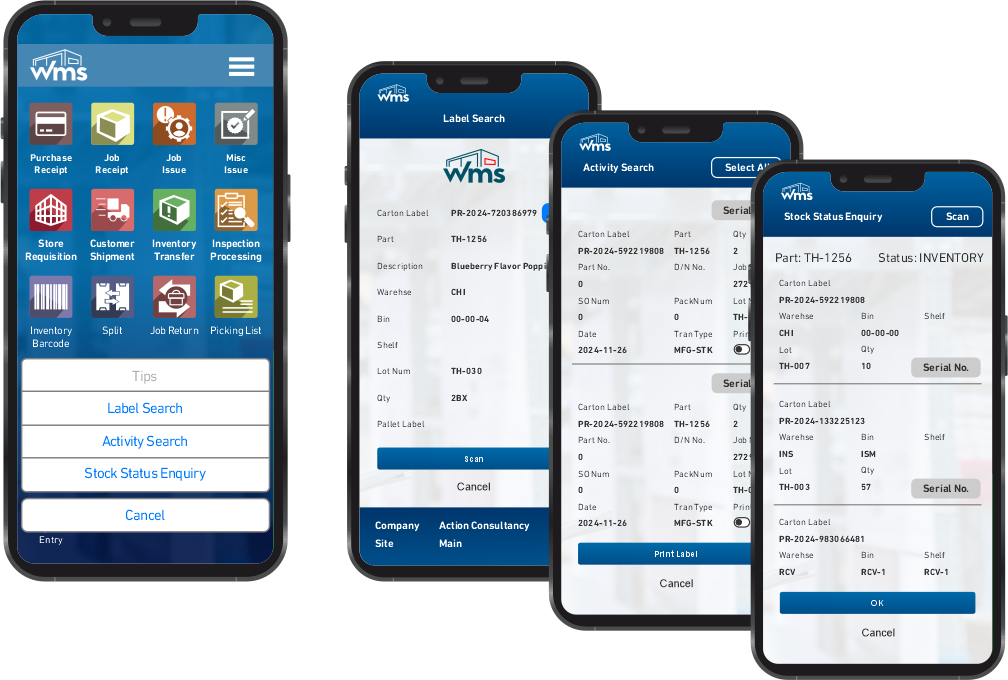
The Enquiry function provides mobile access to inventory balances, order status, and transaction history. Warehouse staff can scan an item, lot, serial, or bin to view on-hand quantity, allocated quantity, and recent movements — all sourced from Epicor ERP — so decisions on the floor are based on real-time data.
Key Highlights
- Item, lot, serial, or bin lookup via barcode or search
- On-hand and allocated quantity by warehouse and bin
- Recent transaction history (receipts, issues, transfers, adjustments)
- Order status for PO, job, or sales order
- Real-time data from Epicor ERP
Enquiry screen showing inventory balance and recent transactions.
Checking stock or order status is instant — scan and see. No more calling the office.