
More than an AI Chatbot.
Turn Epicor ERP Insight into Coordinated Team Action.
Ask. Understand. Collaborate. Act.
Built for Epicor ERP users, EpiCopilot connects live Epicor operational data with business questions and team collaboration in one intelligent workspace.
 AI Workspace
Ask EpiCopilot about risks, orders, materials, or operations…
Epi
EpiCopilot
EpiCopilot is preparing a reply
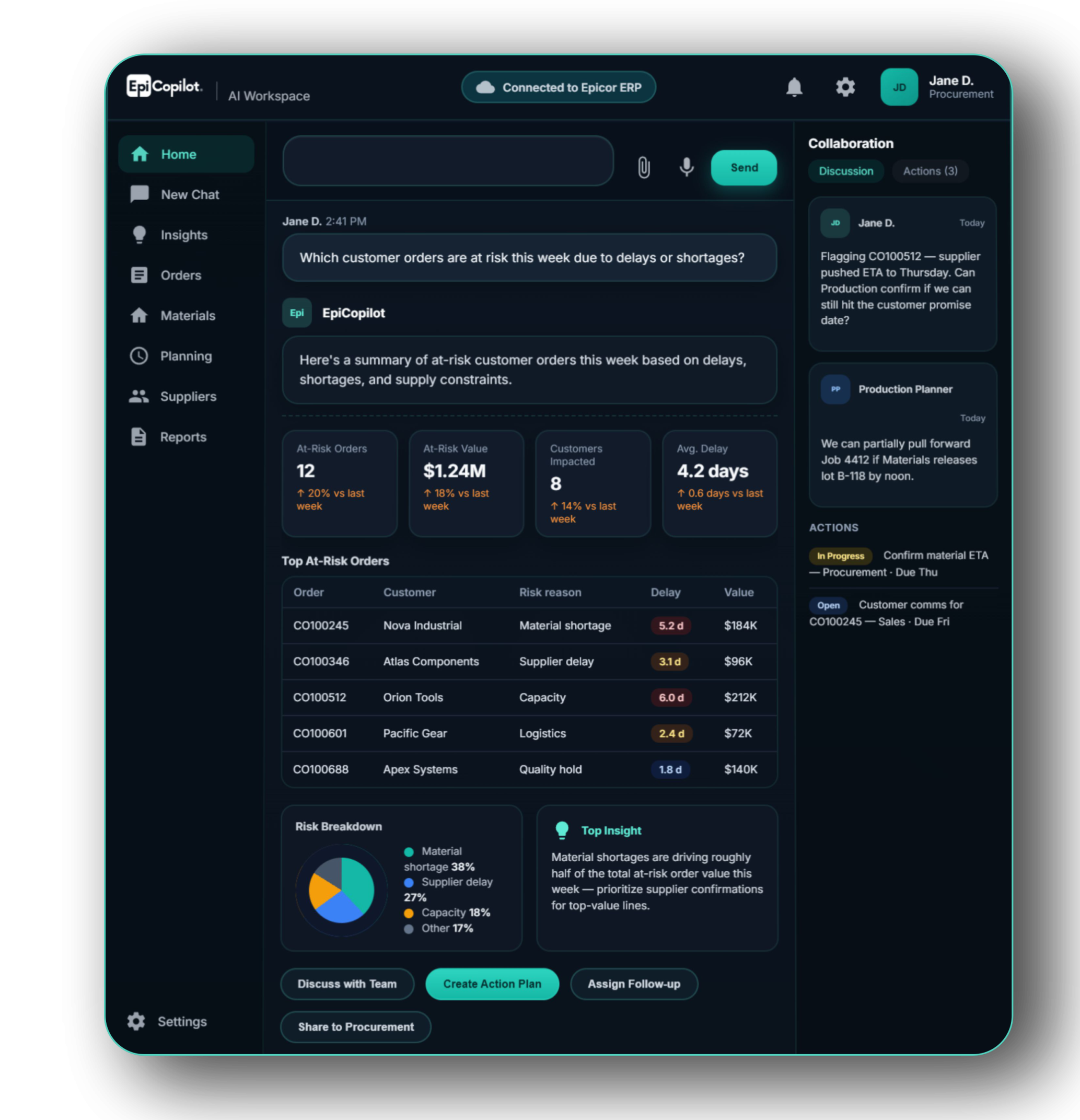
ERP records the business. EpiCopilot helps people act on it.
Epicor ERP is built to capture orders, inventory, purchasing, production, finance, and operational transactions. But recording data is not the same as helping every user understand what is happening, why it matters, and what should be done next.
EpiCopilot adds an AI operating layer on top of Epicor ERP — helping users ask questions, understand live ERP context, identify risks, and move faster from data to action.
Epicor ERP · System of record
EpiCopilot · AI operating layer
Record
Epicor captures what happened.
Orders, materials, suppliers, jobs, shipments, costs, and transactions are recorded inside the ERP system.
Understand
EpiCopilot explains what it means.
Users can ask natural business questions and receive summaries, KPIs, charts, and operational insights from Epicor data.
Act
Teams follow through faster.
When action is needed, EpiCopilot helps teams discuss, assign ownership, and track progress from the AI-generated insight.
Your company already has the data. What your teams need is a faster way to use it.
EpiCopilot helps your teams unlock more value from the Epicor investment you have already made — turning ERP data into clearer answers, faster insight, and coordinated action across roles.
Explore Role-Based Collaboration15 Practical Ways to Use EpiCopilot
From answering questions to coordinating action, EpiCopilot helps Epicor users work faster, understand more, and move issues forward — all in natural language. Click each item to see sample prompts.
Permission-aware and Controlled by Design
EpiCopilot is designed for Epicor ERP from day one — respecting existing Epicor permissions, limiting responses to approved knowledge sources, and supporting deployment choices that fit your governance model. This helps organizations adopt AI confidently, without losing control of data visibility, access, or operational oversight.
Permission-aware data access
Users only see what they are authorized to see.
Controlled knowledge sources
Answers come from approved ERP data and selected business knowledge.
Configurable deployment scope
Cloud or on-premise, aligned with your governance needs.
Role-based visibility and governance
Enterprise-ready controls for practical adoption.
One Workspace. Multiple Roles. Shared Execution.
Each team sees different priorities through Epicor ERP — from customer risk and supplier issues to financial impact, production recovery, and shipment readiness. EpiCopilot brings these roles into one shared workspace so every team can ask better questions, see relevant context, and act in alignment.

CEO / GM
Where are the risks that could affect revenue this week?

Sales
Which orders need proactive customer communication?

Procurement
Which shortages need supplier escalation today?

Finance
Which issues may affect margin or cash collection?

Production
Where do we need schedule recovery actions?

Warehouse
Which shipments need priority handling now?
Most AI chatbots stop at answers.EpiCopilot enables collaboration.
EpiCopilot does more than answer questions. It helps teams share ERP-grounded insight, align around the same issue, assign follow-up actions, and track progress in one workspace. That is what turns an AI chatbot into a practical execution tool.
Share the answer with the right people
When a risk is identified, the next step is not another email chain. EpiCopilot lets users bring the ERP-grounded answer into a shared workspace, so Sales, Procurement, Production, or Warehouse can immediately see the same context.
- Share the ERP answer into a collaboration thread
- Mention the relevant teams or users
- Keep comments connected to the original issue
AI Workspace
Which customer orders are at risk this week due to delays or shortages?
Epi
EpiCopilot
Based on live Epicor data, 12 orders are exposed this week — mainly material delays and capacity constraints. Share this thread so every team works from the same facts.
At-Risk Orders12
At-Risk Value$1.24M
Customers8
Let AI turn the answer into an action plan
After EpiCopilot identifies the risk, it can suggest practical follow-up actions by role — so managers do not need to start from a blank task list.
- Suggest follow-up actions from the AI answer
- Convert recommendations into assigned tasks
- Keep owners, due dates, and ERP context together
Connected to Epicor ERP
EpiCopilot
I found 12 at-risk orders. I recommend the following action plan.
AI-Suggested Action Plan
- Confirm supplier ETA — Procurement
- Review production schedule — Production
- Check shipment readiness — Warehouse
- Update customer communication — Sales
- Confirm supplier ETA Not Started
- Review production schedule Not Started
- Check shipment readiness Not Started
- Update customer communication Not Started
Ask what is still blocking progress
Instead of manually checking every comment and task, users can ask EpiCopilot for a progress summary. It highlights what has been completed, what is still blocked, and where attention is needed next.
- Summarize progress from comments and task status
- Highlight unresolved blockers
- Show the next action needed to close the issue
Issue
Delivery Risk · Week of May 19 · CO100512
You
What is still blocking delivery recovery?
Next focus: Warehouse readiness and customer update.
Procurement
Supplier ETA confirmed
Completed
Production
Schedule adjusted
Completed
Warehouse
Shipment readiness pending
In Progress
Sales
Customer update not confirmed
Not Started
Epicor experience, manufacturing understanding, and delivery capability you can trust.
EpiCopilot is not just an AI concept. It needs real Epicor knowledge, real manufacturing understanding, and real delivery experience. ACC brings all three — with more than 20 years of Epicor experience, a long-standing position in Asia, hundreds of successful projects, and multi-country delivery capability.
20+ Years of Epicor Experience
More than two decades of hands-on Epicor consulting, implementation, and solution delivery across manufacturing environments.
Epicor’s First Partner in Asia
A long-established Epicor partner in Asia, with deep regional experience and a strong understanding of how Epicor is applied in real operations.
Hundreds of Successful Projects
A proven track record built on hundreds of successful projects — helping manufacturers improve operations, visibility, and execution with Epicor.
Multi-Country Delivery Capability
Delivery and support experience across multiple countries, helping regional and multi-site manufacturers roll out solutions with greater consistency and confidence.
FAQs and AI adoption guidance
Frequently Asked Questions
EpiCopilot is built for Epicor users, with integration to Epicor ERP and collaboration around real business issues. A generic chatbot may answer standalone questions, but EpiCopilot is designed to work with Epicor context — helping users understand ERP data, share answers with the right teams, assign follow-up, and track progress in one workspace. The difference is not only the answer, but what teams can do after the answer.
Start with a practical business scenario, not a broad AI transformation project. Many companies know they need AI, but the challenge is where to begin. A strong starting point is a high-value operational question, such as delivery risk, material shortage, production delay, supplier follow-up, or management reporting. EpiCopilot gives teams a practical AI interface connected to Epicor context.
Because having data is not the same as using data quickly. Many companies already have the information they need inside Epicor, but users still need to search screens, export reports, ask colleagues, or wait for IT support. EpiCopilot helps shorten that gap by letting users ask business questions in natural language and receive ERP-grounded answers faster.
EpiCopilot should respect the same access logic that governs Epicor users. A user should only receive answers based on the data they are authorized to access. This is critical for finance, cost, customer, supplier, and management-sensitive information. The purpose is to make AI useful without bypassing enterprise control.
EpiCopilot is designed with real Epicor environments in mind, including customers who are not ready to rely only on cloud-based AI services. Many Epicor customers still operate in on-premise, hybrid, or controlled IT environments. EpiCopilot can be positioned as a practical path for introducing AI while respecting deployment scope, governance, and data-control requirements.
It helps business users answer many operational questions without always waiting for manual reports or ERP support. Instead of asking IT or the ERP team to extract data, explain status, or prepare ad-hoc reports, users can start with natural-language questions. This allows IT and ERP teams to focus more on system improvement, governance, and higher-value projects.
Yes. Senior users do not only need to know that an order is delayed; they need to understand whether the issue comes from material shortage, supplier delay, production capacity, quality hold, warehouse readiness, or customer priority conflicts. EpiCopilot is designed to help turn ERP data into business meaning.
Yes. This is one of the key differences from a typical AI chatbot. Many AI tools stop after giving an answer. EpiCopilot helps teams share the answer, discuss the issue, assign owners, create follow-up actions, and track progress around the same business context. This makes it more useful for operational execution, not just information retrieval.
It can summarize cross-functional ERP information into a decision-ready view. For example, a director may ask which customer orders are at risk this week. The answer may require sales order data, material availability, supplier ETA, production status, warehouse readiness, and customer priority. EpiCopilot helps bring these signals together so management can see risk earlier and act faster.
Start with one focused use case where the business impact is visible. Good first-phase scenarios include delivery risk, material shortage, production delay, supplier follow-up, customer order visibility, or management reporting. A focused first phase makes the value easier to demonstrate, the deployment scope easier to control, and the next expansion easier to justify.
AI adoption needs a practical starting point.
Most companies know they need AI.
The challenge is where to begin.
A chatbot gives users the first practical interface to communicate with AI.
EpiCopilot brings that starting point into Epicor ERP.
Users begin with real business questions, using the ERP context they already trust.
Ready to Transform How Your Teams Use ERP?
EpiCopilot brings answers, insight, and coordinated action closer to your daily operations.